


In this post, we are going to install Python, look at the ten Python data types, and write a few lines of very simple Python code. You may need to use Terminal in some cases, but I won’t touch the details about shell scripts here.
Installation #
Python is free and open-source, and installing Python is extremely easy: just go to the official website, click the yellow “Download Python version number” button, double click the .pkg you download, and click continue a lot of times–just as installing any other softwares.
After installation, you also need an editor to write code. My current most frequantly used editor is Visual Studio Code, or VS Code, which has multiple selection, powerful find and replace, and smart folding and unfolding. With the versitile extension marketplace, I even write Stata code in it, since the Stata do file editor cannot fold easily with tabs, and thus bad for long do files. For more VS Code tricks, you can look at their offical user guide, or just search whatever you think in Google!
Installing VS Code is also extremely easy: Just go to its official website and you can find the blue “Download” button on the left and top right. Then follow the instruction, you will have it installed on your computer.
Personally, I think Jupyter Notebook is a good place to start coding, as you can get the output for each code block, which is very helpful to see what change have your code made. To use Jupyter Notebook in VS Code, just click the “L-tetromino” shape button on the left, then search “jupyter” in the search bar, and finally click “install” to get Jupyter Notebook inside VS Code.
 As I have already installed, there is no "install" button here.
Side note: you can also use Jupyter Notebook directly on your computer and use it in your web browser. You may need to use Terminal and pip to install it. Please see official instructions for more information. Since JupyterLab is the newer version of the notebook, if you want to download it, I would recommend you to start directly from JupyterLab instead of Jupyter Notebook.
Finally is the last step before actually coding: create a new Jupyter Notebook with your preferable file name and .ipynb extension, then click “select kernal,” and then select a Python environment. If this is the first time for you to use python, then there will be only one global environment here. Select that, and we are ready to start!
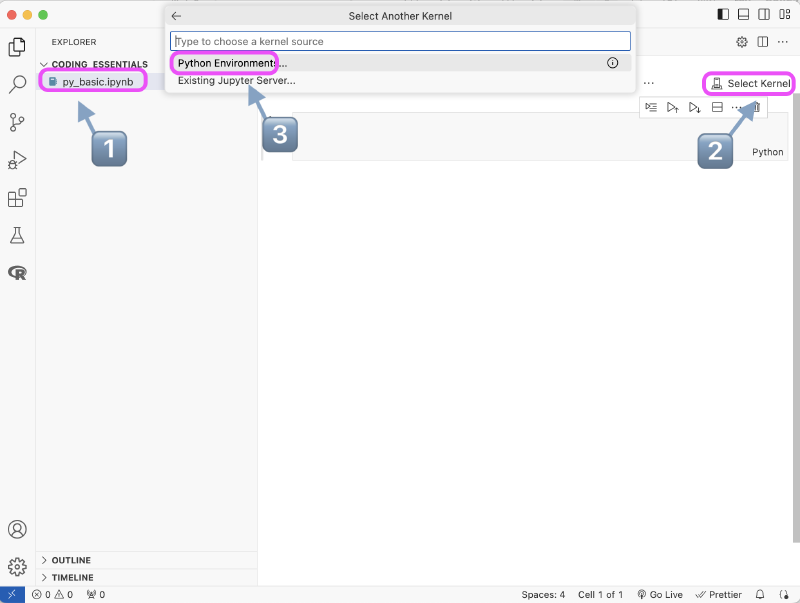
Side note: environment management is also very important in the later stage as you start to use different packages. As there may be conflicts between packages, it is important to separate them. I will introduce more on this topic in part 6.
«««< HEAD
#
=======
To get the type of a variable, use type() function. You can easily find all the python data types online. I’m going to cover the ones I usually use in this section.
int #
i = 5
print(type(i))
float #
f = 0.5
print(type(f))
Note 1: Division and multiplication will change integer to float, so use int() convert the data type if you do not wish this happens.
f = 200
g = f/2
print(g, type(g))

k = f * 0.5
print(k, type(k))

l = int(f/2)
print(l, type(l))
Note 2: Division and multiplication are different in precision. Use round() to get desired number of digits.
n = 56
a = n * 0.1
b = n / 10
print(a, b, a == b)
print(round(a,1), round(b,1), round(a,1) == round(b,1))
str #
Strings are indexed in Python. Therefore, you can apply slicing to strings.
s = "String"
s1 = s[:4]
print(s1)
Note 1: Indices start from 0.
s2 = s[0]
print(s2)
Note 2: String is immutable.
s[0] = sYou will get a TypeError from the code above.
Note 3: f-string
You can use + to combine strings, but sometimes it can be tedious, and f-string can be a better choice.
p = "A"
page_num = 220
s3 = "part " + p + " page " + str(page_num)
print(s3)
s4 = f"part {p} page {page_num}"
print(s4)
Note 4: You can use "" inside '' or '' inside "".
s = '"Cat"urday'
h = "Shakes'pear'e"
print(s, "\n", h) # "\n" to change line
Note 5: Python has many built-in functions for string. You can change cases of letters, removing extra spaces, finding the position of a certain word, etc. You don’t need to remember them. You only need to be aware that they exist, and you can find them when you need to use them. Use Google to find these ==Python String Methods== and have an impression of them.
bool #
The values are True and False. When you write if-condition or while loop, the program proceed when the statement is True. Empty values, such as empty list and empty set, 0, and False itself are equavalent to False.
print(bool(1))
print(bool(0))
print(bool([1]))
print(bool([]))
set #
Sets do no have orders or duplicate elements.
set_1 = {1,2,3}
set_2 = {3,2,1}
set_3 = {1,2,3,3,3}
print(set_3)
print(set_1 == set_2, set_1 == set_3)
Note 1: You can not apply slicing to the set.
print(set_1[1])
# And you will get a TypeError
Note 2: I do not usually use set in my code.
list #
List is my most frequently used data type. List items are ordered and mutable, allow duplicate values, and can contain any data type.
# Indices also start from 0.
list_1 = [1,2,3,4]
print(list_1[0])

# Use slicing. Left index is included, but right index not.
list_2 = list_1[2:]
list_3 = list_1[0:2]
print(list_2)
print(list_3)

# mutable
list_3 = [0,1,2,3,4]
list_3[0] = 9
print(list_3)
Note 1: Working with list is much easier than working with string. Use split() and join()
str_1 = "Splits the string at the specified separator"
list_1 = str_1.split()
str_2 = f"{"_".join(list_1[:4])} {" ".join(list_1[4:])}"
print(str_2)
Note 2: Visualize the code below to understand the mutability of list.
# int is not mutable.
a = 1
b = a
a = 2
print(b) # b is still 1

# list is mutable
a = [1,2,3,4]
b = a
a[0] = 9
print(a)
print(b) # The first element will change as a changes
Note 3: Like string, there are also built-in list functions in python. Search ==Python List Methods== and have an impression of them.
dict #
Dictionaries store data in key:value pairs. I mainly use this to generate data frame in pandas.
dict_1 = {
  'country': 'US',
  'state': 'Alabama',
  'capitol city': 'Montgomery'
}

print(dict_1['country'])
range #
if #
for #
List Comprehension #
while #
Exercises #
-
You have a 20-page pdf document and want to save each page as a single “png” file. Create a list of file names with the format of
page_#.png. -
Get the unique values of the list
l = [0, 1, 1, 1, 3, 4, 6, 2, 2, 5, 5, 10]in ascending order -
Print years 1900-1930 except for the leap years. Then write a function to identify if a user-input random year is a leap year.
-
Generate a list of year-month pair from Jan 1800 to Dec 1850.
b5d4829 (WIP or descriptive message)